Showing posts with label SYSTEM UTILITIES. Show all posts

Wednesday, May 5, 2010

Spybot Search & Destroy 1.6.3.51 Beta

0 comments
Spybot - Search & Destroy can detect and remove spyware of different kinds from your computer. Spyware is a relatively new kind of threat that common anti-virus applications do not yet cover. If you see new toolbars in your Internet Explorer that you didn't intentionally install, if your browser crashes, or if you browser start page has changed without your knowing, you most probably have spyware. But even if you don't see anything, you may be infected, because more and more spyware is emerging that is silently tracking your surfing behaviour to create a marketing profile of you that will be sold to advertisement companies.

Spybot-S&D is free, so there's no harm in trying to see if something snooped into your computer, too :)If SpyBot-S&D finds such modules, it can remove them - or replace them with empty dummies in case their host software won't run with its bot removed. In most cases, the host still runs fine after removing the bot. For a list of 'supported' bots see the feature lists below. The Spybot-S&D interface is so easy, that updates just require replacing a file of about 80k in size. Those updates are distributed by my software mailinglist, at the authors page and are also available from inside the programs update section.Another feature of Spybot S&D is the removal of usage tracks, which makes it more complicated for unknown spybots to transmit useful data. The list of last visited websites, opened files, started programs, cookies, all that and more can be cleaned. Supported are the three major browsers Internet Explorer, Netscape Communicator and Opera.


Tuesday, May 4, 2010

CCleaner v2.20.920

0 comments
CCleaner is a freeware system optimization, privacy and cleaning tool. It removes unused files from your system - allowing Windows to run faster and freeing up valuable hard disk space. It also cleans traces of your online activities such as your Internet history. Additionally it contains a fully featured registry cleaner. But the best part is that it's fast (normally taking less than a second to run) and contains NO Spyware or Adware!

- Added support for Google Chrome recently closed tabs.
- Disabled removal of most recent System restore point.
- Fixed bug with Internet Explorer 8 Compatibility View settings.
- Improved uninstaller support for Windows 7.
- Enhanced right-click menu options for Cleaner screen tree.
- Added extra information under title for Options and Tools screens.
- Added right-click menu to Registry screen tree.
- Added support to multi-select items in Include, Exclude and System Restore screens.
- Added language support for Estonian and Farsi.
- Internal 64-bit improvements.
- Minor bug fixes.


Download
Details: CCleaner 2.20.920 | 3.10MB

CCleaner 2.19.901

0 comments
CCleaner is a freeware system optimization, privacy and cleaning tool. It removes unused files from your system - allowing Windows to run faster and freeing up valuable hard disk space. It also cleans traces of your online activities such as your Internet history. Additionally it contains a fully featured registry cleaner. But the best part is that it's fast (normally taking less than a second to run) and contains NO Spyware or Adware.

Updates:
- Fixed bug in Firefox introduced in build 900.


Download

Monday, May 3, 2010

Glary Utilities PRO 2.21.0.863 Multilingual Portable

0 comments
image of Glary Utilities PRO 2.21.0.863 Multilingual PortableGlary Utilities is a collection of system tools and utilities to fix, speed up, maintain and protect your PC. It allows you to clean common system junk files, as well as invalid registry entries and Internet traces (theres a plug-in support for 45+ external programs). You can also manage and delete browser add-ons, analyze disk space usage and find duplicate files.

Furthermore, Glary Utilities includes the options to optimize memory, find, fix, or remove broken Windows shortcuts, manage the programs that start at Windows startup and uninstall software. Other features include secure file deletion, an Empty Folder finder and more. Other features include secure file deletion, an Empty Folder finder and more. All Glary Utilities tools can be accessed through an eye-pleasing and totally simplistic interface.
Designed for Windows 98, Me, 2000, XP and Windows Vista.

Features:
• Disk Cleaner Removes junk data from your disks and recovers disk space
• Registry Cleaner Scan and clean up your registry to improve your system's performance.
• Shortcuts Fixer Corrects the errors in your startmenu & desktop shortcuts
• Startup Manager Manages programs which run automatically on startup
• Memory Optimizer Monitors and optimizes free memory in the background
• Tracks Eraser Erases all the traces,evidences,cookies,internet history and more
• File Shredder Erases files permanently so that no one can recover them
• Internet Explorer Assistant Manages Internet Explorer Add-ons and restores hijacked settings
• Disk Analysis Get details information of the desired files and folders
• Duplicate Files Finder Searchs for space-wasting and error producing duplicate files
• Empty Folders Finder Find and remove empty folders in your windows
• Uninstall Manager Completely uninstall programs you don't need any more
• Context Menu Manager Manage the context-menu entries for files, folders...


Download (rapidshare)


Details: Glary Utilities PRO 2.21.0.863 Multilingual Portable

Speed Up MY PC 2010 Version 4.2.1.1

0 comments
image of Speed Up MY PC 2010 Version 4.2.1.1Do you often notice that your PC just doesn’t run as smoothly as it used to and need to speed up computer? This could be caused by anyone of several problems or a combination of all of them. The problem is, monitoring today’s PCs is increasingly difficult and time consuming. Even experienced users find effective control of all the settings and resources of their PCs hard to achieve. SpeedUpMyPC 2010, Uniblue's award-winning speed up computer solution, lets you monitor and control all your PC resources with easy, one click instructions.

The Solution
System settings, internet usage, disk clutter, RAM and CPU are all automatically scanned, cleaned and optimized for peak performance. You can also selectively disable or remove unnecessary background and auto-start processes to cut valuable seconds off your startup time.

New features
Improved GUI ,Easier to use
Improved and faster speed scan Even more effective tweaks
Automatic speed tools for on-going optimization Localized in 12 languages
64-bit support Works also on Windows Vista and 7

User Interface
Windows Familiar GUI Automatic Speed Scan
System Overview and Recommendations System Tray Shortcut
System Optimization State Extensive Manual and Help
LiveUpdate

System tweaks
Automatic optimization and cleanup Memory freeup
Network/connectivity tweaks Microsoft Internet Explorer tweaks
Mozilla Firefox tweaks Windows performance tweaks
Hard drive tweaks Windows XP user interface tweaks
Windows Vista user interface tweaks Windows startup optimization
Remote access service tweaks Host service tweaks
Recovery center to undo changes Advanced GUI features

Speed tools

Proactive Thumbnail generator CPU Manager
Software Quick-Starter

Junk cleanup
Junk file cleanup Detailed junk file cleanup scan results
Disable unnecessary services/processes

Settings
Launch application at startup Check for updates every time SpeedUpMyPC starts
Start scanning when application loads Perform automatic speed tools, system tweaks and junk file cleaning after every scan


TuneUp Utilities 2010 9.0.3000.136 + Keygen

0 comments
image of TuneUp Utilities 2010 9.0.3000.136 + KeygenTuneUp Utilities can make your Windows operating system faster, more comfortable and more secure with just a few mouse clicks. And all operations performed on the operating system are completely safe, because all changes are monitored by TuneUp Rescue Center and can be undone at any time. All TuneUp Utilities modules can be accessed through a common interface that is divided into six categories.

The software helps both beginners and experts to make Windows meet their needs in a way that is better, easier and safer. All important system options are explained in an easy way and can be turned on or off at the click of your mouse. TuneUp Utilities will then make the necessary changes in the registry or boot files automatically. We place a high value on system stability, so that Windows won't stop working reliably. And most changes that you make can be undone in TuneUp Rescue Center - easily and safely.

TuneUp Utilities automatically runs important maintenance tasks for you, makes you aware of any problems and offers simple solutions. This ensures performance is always at its best. A slow and untidy computer is now a thing of the past for you. You can also use TuneUp Utilities to customize the appearance of your Windows system - to make working on your computer more enjoyable.

With TuneUp Utilities you will quickly make your Windows system faster and more convenient to use- and ensure that it stays like this for the long term. This makes TuneUp Utilities the perfect program for everyone: for those who would rather leave the computer maintenance to a reliable partner as well as for those who would rather do everything themselves.

The TuneUp Turbo Mode provides an immediate performance boost whenever you need it. When you use your computer in the TuneUp Turbo Mode, an analysis is performed to see which tasks, programs and functions are currently running in the background that are not strictly necessary. These programs are stopped or slowed down, allowing the additional processing power gained to be used exclusively by the programs you are actually running.

Maintain System
Regular maintenance increases the stability of your PC, but is complicated and takes a lot of time when doing it manually. Spare yourself the stress! With TuneUp Utilities, you can clean up your computer and delete unnecessary files with only one click. Neat!
• 1-Click Maintenance and Automatic Maintenance
• Optimize system startup and shutdown
• Defragment hard disks
• Remove broken shortcuts
• Defragment registry
• Clean registry

Increase performance
Whether you are working or gaming: TuneUp Utilities increases the performance of your PC. Programs that are used rarely or never are tracked down, startup processes are shortened and unwanted garbage files are eliminated. For trouble-free working on your PC.
• Turbo Mode
• Configure Live Optimization
• Free up disk space
• Configure system startup
• Display and uninstall programs

Fix problems
With only a few clicks, you can fix typical Windows problems as easy as pie — without being a PC expert yourself. TuneUp Utilities finds errors on data carriers and fixes them automatically — about 60 of the most frequent problems under XP™, Vista™, and Windows 7™. TuneUp Utilities can even restore files deleted by accident — quickly, easily, and reliably.
• Fix typical problems
• Restore deleted data
• Check hard drive for errors
• Manage running programs

Customize Windows
Give your Windows a new look with TuneUp Utilities and customize programs and system settings to meet your needs: cool new boot screens, icons, and animations provide that personalized look for your Desktop. You can easily customize the appearance of Windows and settings of many programs to your liking.
• Personalize Windows appearance
• Change Windows settings

Additional functions
TuneUp Utilities offers you transparency and safety and keeps you up to date. Stay informed with the System information and Optimization Report, undo changes made accidentally, or check for available updates. From fast and safe editing of the registry to deleting data — even computer experts will find applications to meet their needs.You can find all the features that provide you with an overview of your PC and more security in this area.
• Display TuneUp Optimization Report
• Undo changes
• Check for updates
• Show system information
• Permanently erase data
• Editing the registry

 
or Mirror 1 (rapidshare)
 
or Mirror 2 (hotfile)

Get the best PC Performence with WinUtilities

0 comments
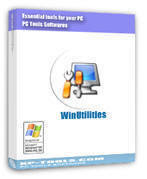
image of WinUtilitiesWinUtilities is an award winning collection of tools to optimize and speedup your system performance. this suite contains utilities to clean registry, temporary files on your disks, erase your application and internet browser history, cache and cookies. you can control startup programs that load automatically with windows, find duplicate files, fix broken shortcuts and uninstall unneeded software. other features include secure file deletion, recycle bin shredding, cleaning tasks scheduling and undelete deleted files.

What’s New in WinUtilities 6.6?
* Added a ’shut down when done’ function in One Click Maintenance module.
* Added a ’shut down when done’ function in File Shredder module.
* Disk Cleaner supports to clean restore points automatically.
* Registry Cleaner supports to clean restore points automatically.
* Added a ‘Clean Temp Files’ function in File Shredder moudle.
* Disk Cleaner supports to clean unused Windows components.
* Improved the scanning engine algorithms in Duplicate File Finder module.


Download (Hotfile)
 

or Mirror 1 (Hotfile)
 

or Mirror 2 (Ul.to)
 

or Mirror 3 (Rapidshare)
 

Details: YL Computing WinUtilities v6.6 WinAll Incl Keygen-CRD | 5.99 MB

Sunday, May 2, 2010

Speed Up your PC with Super Utilities Pro 2008

0 comments
image of Super Utilities Pro 2008Super Utilities offers 28 tools for fixing, speeding up, maintaining, and protecting your PC. Super Utilities - Make your computer run faster, safer, with greater privacy and security. With only a few minutes of tweaking, Super Utilities will optimize the performance of your computer, corrects problems and helps you to customize your system to suit your needs. Super Utilities (for Windows 98/Me/2000/XP/2003/Vista) is a collection of tools to fix, speed up, and maintain your PC!

These utilities include Disk Cleaner, Registry Cleaner, Uninstall Plus, StartUp Manager, Folder Guard, Tracks Washer, Driver Backup, Auto Shutdown, Windows Manager and Process Manager. With a cool and user-friendly interface makes it easy for anyone to use Super Utilities.

Full service for your windows PC
- Super Utilities offers 28 tools for cleaning,fixing, speeding up, maintaining, and protecting your PC.
- System Cleaner: Make your PC faster, more stable, and more efficient by cleaning and optimizing your hard drive, memory, software, and Windows Registry.
- Security Doctor: Protect your PC from thousands of potential spyware, adware, trojans, keyloggers and tracking threats.
- Privacy Protector: Keep your sensitive information safe from prying eyes.
- System Maintenance: Easily perform complicated system maintenance tasks, and keep your computer running quickly and smoothly.
- Special Tools: More easy-to-use tools that make your computing safer and more efficient.
- More windows utilities will be added.
- Disk Cleaner. Get rid of junk files on your PC
- Registry Cleaner. Clean and optimize your system registry
- Uninstall Plus. Completely uninstall any software
- Memory Turbo. Recover, defragment, & optimize system memory
- Shortcuts Repairer. Find and fix broken shortcuts
- Spyware Removal. Remove spyware, adware, trojans, and keyloggers
- StartUp Organizer. Start-up Windows faster
- Super Task Manager. Take control of all running processes
- Service Manager. Take control of all windows services
- BHO Cleaner. Remove unwanted browser helper objects
- IE Password Manager. Manage passwords and AutoComplete strings of IE
- Hide Folder. Hide your files and folders
- Tracks Washer. Cover the tracks you leave behind
- IE Privacy Manager. Manage typed URLS and history items of IE
- Super ExeLock. Password protect your programs
- Super Shredder. Securely delete sensitive information
- SuperMenu Guard. Protect favorite sites and start menu
- Windows Manager. Tailor windows to meet your individual needs
- IE Protector. Protect the settings of Internet Explorer
- Driver Backup. Grab all of your drivers, and store them for you in a safe place
- File Type Manager. A sophisticated file type management tool
- Windows Tools. Several essential utilities of windows
- System Information. Gather information about your hardware and software
- Auto Shutdown. A complete shutdown, restart, and logoff manager
- Folder Analyzer. Find out where all your hard drive space went
- Super Undelete. Recover deleted files
- Super Shell. A unique handy collection of tools
- Super Mounter. Mount ISO file as virtual CD-ROM


Download (Uploading)
 

or Mirror 1 (Depositfiles)
 

or Mirror 2 (Easyshare)
 

or Mirror 3 (RapidShare)
 

Details: Super Utilities Pro 2008 v9.49 |5 Mb
 

Copyright 2008 All Rights Reserved Revolution Two Church theme by Brian Gardner Converted into Blogger Template by Bloganol dot com